

At a glance
- The short version: The Claude Code SDK was renamed the Claude Agent SDK. It allows you to integrate Claude Code’s agent loop, tools, and context management into your own Python or TypeScript applications.
- Packages:
@anthropic-ai/claude-agent-sdk(TypeScript) andclaude-agent-sdk(Python). The old@anthropic-ai/claude-codeandclaude-code-sdknames are the ones to leave behind.- Core call:
query()starts an agent session and streams messages back until a finalResultMessagearrives.- Safety levers:
allowedTools,disallowedTools, permission modes, hooks, and an optionalcanUseToolcallback.- Cost levers:
maxTurns,maxBudgetUsd, and aneffortsetting.- Watch out for: The SDK no longer applies Claude Code’s system prompt by default, and
allowedToolspre-approves tools rather than restricting them.
If you search for the Claude Code SDK today, you will find a mix of old tutorials, new documentation, and a few pages that still treat the two names as different products. They are not. Anthropic renamed the Claude Code SDK to the Claude Agent SDK, moved its documentation, and changed a few defaults along the way.
That sounds like a small naming footnote. In practice it trips people up, because a half-migrated project can fail in confusing ways: an import that no longer resolves, an options class that has disappeared, or an agent that behaves differently because the default system prompt changed. This guide sorts out what the SDK is, what changed, and how the main pieces fit together. It is written for developers and technical leads who want an accurate mental model before they write code.
A note on method. Everything here comes from Anthropic’s published documentation, the public SDK repositories, and a small number of clearly labeled community sources. Nothing below describes personal experience with the tooling. The SDKs move quickly, so treat version numbers as signposts and confirm details against the live docs before you depend on them.

Table of Contents
The Name Change: From Claude Code SDK to Claude Agent SDK
The official migration guide opens plainly: the Claude Code SDK has been renamed to the Claude Agent SDK, and its documentation has been reorganized. The stated reason is scope. The SDK began as a way to script coding tasks, then grew into something suited to agents of many kinds, so the name was widened to match.
| Aspect | Old | New |
|---|---|---|
| TypeScript package | @anthropic-ai/claude-code | @anthropic-ai/claude-agent-sdk |
| Python package | claude-code-sdk | claude-agent-sdk |
| Python options class | ClaudeCodeOptions | ClaudeAgentOptions |
| Python import | claude_code_sdk | claude_agent_sdk |
| Documentation | Claude Code docs | A dedicated Agent SDK section |
The Python repository shows how deliberate the transition was. A September 2025 pull request added a deprecation warning to both the ClaudeSDKClient class and the query() function, telling users that the package had been renamed and pointing them to migration guidance.
Migration Steps in Brief
For a TypeScript or JavaScript project, the guide says to uninstall the old package, install the new one, and change your imports:
npm uninstall @anthropic-ai/claude-code
npm install @anthropic-ai/claude-agent-sdk
// Before
import { query, tool, createSdkMcpServer } from "@anthropic-ai/claude-code";

// After
import { query, tool, createSdkMcpServer } from "@anthropic-ai/claude-agent-sdk";
If the old package is still listed in package.json, replace it and update the version range as well. The guide’s example moves from ^0.0.42 to ^0.3.0. Python follows the same pattern: uninstall claude-code-sdk, install claude-agent-sdk, and update imports and any entries in requirements.txt or pyproject.toml. Pip prints a harmless warning if the old package was never installed.
Breaking Changes Worth Knowing
The migration documentation identifies v0.1.0 as a breaking release for the Claude Agent SDK, with changes focused on tighter isolation and clearer configuration. Three items matter most.
The options class was renamed. In Python, ClaudeCodeOptions became ClaudeAgentOptions. It is a straight rename, but it breaks any code that constructs options with the old name.
Claude Code’s system prompt is no longer the default. Before v0.1.0, an agent inherited Claude Code’s system prompt. Now the SDK starts from a minimal prompt. If you want the old behavior, you ask for it explicitly with the preset:
const result = query({
  prompt: "Hello",
  options: { systemPrompt: { type: "preset", preset: "claude_code" } }
});
This is the change most likely to cause a quiet behavior shift. An agent that felt like Claude Code before migration may feel plainer afterward until you add the preset or supply your own prompt.
Filesystem settings loading was briefly changed, then reverted. The guide says the default was changed in v0.1.0 to load no filesystem settings and then reverted, so no action is needed. The current behavior: omit settingSources and the SDK loads user, project, and local settings, matching the CLI. That includes ~/.claude/settings.json, .claude/settings.json, .claude/settings.local.json, CLAUDE.md files, and custom commands. To run isolated, pass settingSources: [] (or setting_sources=[] in Python). One caveat from the docs: Python SDK 0.1.59 and earlier treated an empty list the same as omitting the option, so upgrade before you rely on it.
The guide singles out CI/CD pipelines, hosted applications, test environments, and multi-tenant systems as places where isolation matters, because local customizations should not leak in.
What the Claude Agent SDK Actually Is
The overview page defines an agent as an application that completes a task by planning its own steps and calling tools that read files, run commands, or edit code. The SDK gives you the same tools, agent loop, and context management that power Claude Code, programmable in Python and TypeScript.
The practical difference from calling a model API directly is who executes the tools. The quickstart makes the point in one line: Claude executes tools directly instead of asking you to implement them. You do not write a loop that parses tool requests and feeds results back. The SDK does that.
Both SDKs bundle a native Claude Code binary, according to the agent loop documentation, so most installs need no separate Claude Code installation. The Python reference also lets you point to a custom executable through a cli_path option, and it raises a CLINotFoundError if the binary cannot be located.
How It Compares With Other Claude Options
The overview includes a decision table that is worth reading before you pick a tool. Here is how these products compare, based on the documentation’s own wording:
| You want to | Use | What you get |
|---|---|---|
| Embed Claude Code’s agent in your own Python or TypeScript app, in a process you operate | Agent SDK | A library that runs the Claude Code binary, with built-in tools, permissions, sessions, and hooks |
| Do interactive development or one-off tasks from a terminal | Claude Code CLI | The terminal interface built for daily interactive use |
| Call the Claude API directly from your code | Client SDK | Direct API access; you write the tool loop yourself or use the beta tool runner |
| Have Anthropic host the agent | Managed Agents | A hosted harness with sessions in a managed cloud sandbox or a self-hosted sandbox |
If your language is neither Python nor TypeScript, the docs suggest running the CLI as a subprocess with the -p flag and --output-format json to drive the same loop.
Capabilities Inherited From Claude Code
The overview lists what carries over: built-in tools, hooks, subagents, MCP connections, permissions, sessions, skills, slash commands and memory loaded from .claude/ directories, and plugins. That last group is the most interesting for teams. The SDK uses the same filesystem-based configuration as the CLI, allowing project-level CLAUDE.md files, skills, and custom commands to guide an SDK agent without additional code, as long as the relevant settings permit them.
Developers who want to explore the command-line workflows available in the underlying tool can also review our guide to Claude Code commands.
Installing and Authenticating
Installation is a single package for each language.
npm install @anthropic-ai/claude-agent-sdk
# or, for Python
pip install claude-agent-sdk
The Python documentation includes an important caution: recent Debian, Ubuntu, and Homebrew Python installations may reject packages installed into the system interpreter with an externally-managed-environment error. Create a virtual environment before installing dependencies. The quickstart also shows uv as an alternative.
Authentication follows the quickstart: set the ANTHROPIC_API_KEY environment variable, and the SDK reads it. There is a policy detail developers should not skip. Unless previously approved, Anthropic does not allow third-party developers to offer claude.ai login or claude.ai rate limits for their products, including agents built on the SDK. The documentation recommends using API key authentication as an alternative.
Amazon Bedrock and Google Cloud’s agent platform appear in the Python reference as providers that influence some behaviors, such as thinking display, so the SDK is not limited to one hosting route. For gateway setups, the env option can pass variables such as ANTHROPIC_BASE_URL to the underlying process.
For a related approach to routing Claude Code requests through a configurable proxy, see our practical guide to Claude Code Router.
Your First Agent
The quickstart builds an agent that finds and fixes bugs in existing code. The core is a single query() call:
import { query } from "@anthropic-ai/claude-agent-sdk";

for await (const message of query({
  prompt: "Find and fix the bug in auth.ts",
  options: {
    allowedTools: ["Read", "Edit", "Glob"],
    permissionMode: "acceptEdits"
  }
})) {
  console.log(message);
}
The docs explain both options. allowedTools pre-approves Read, Edit, and Glob, so calls to them proceed without a prompt. permissionMode: "acceptEdits" auto-approves file changes. Python is nearly identical, using ClaudeAgentOptions and async for, wrapped in asyncio.run().
The function returns an async iterator that streams messages as Claude works, which brings us to the part of the SDK that explains almost everything else.
How the Claude Agent SDK Works
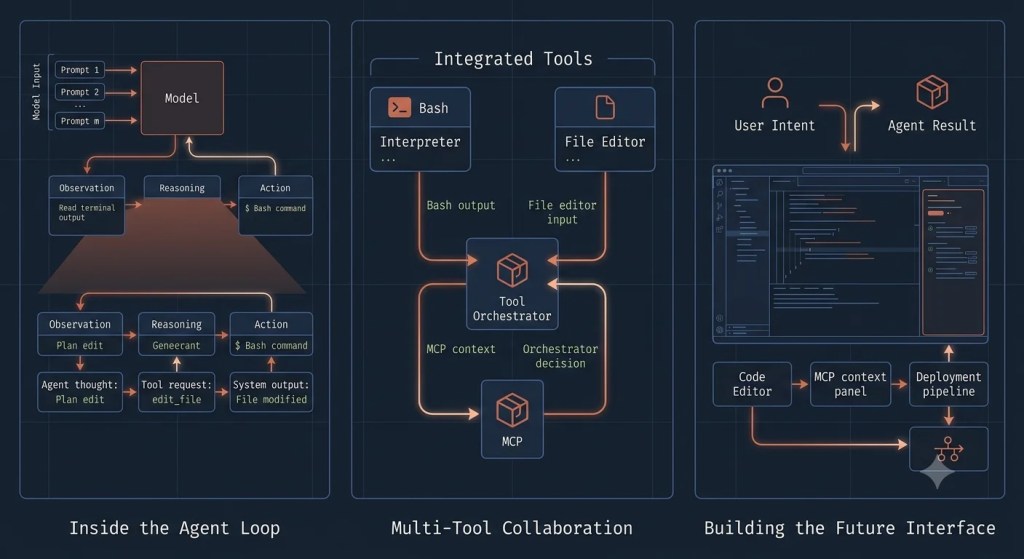
The Claude Agent SDK lets developers build applications that use Claude to interpret requests, work with tools, and complete multi-step tasks. When an application sends a request through the SDK, Claude processes the available context and determines what to do next. Depending on the task and the configured tools, it may request actions such as reading or editing files, running commands, or interacting with connected systems. The SDK manages the interaction between Claude and those tools, passing their results back to Claude so it can decide whether another step is needed. This cycle continues until the task reaches a stopping point, after which the application receives the resulting response. The exact workflow depends on the tools, permissions, configuration, and execution environment provided by the developer.
The Agent Loop: What Happens Inside query()
The agent loop documentation describes five steps. Claude receives the prompt along with the system prompt, tool definitions, and history. It evaluates and responds with text, tool calls, or both. The SDK executes the requested tools. Those results feed back for another evaluation. The cycle repeats until Claude replies with no tool calls, at which point the SDK yields a final ResultMessage.
One round trip is a turn. The docs walk through a four-turn example: Claude runs the test suite, reads two files, edits one file and re-runs the tests, then returns a text-only summary. Three turns contain tool calls and the last does not.
Message Types You Will See
The stream carries five core message types:
| Type | When it appears | Why you care |
|---|---|---|
SystemMessage | Session events, starting with an init subtype | Session metadata, compaction boundaries |
AssistantMessage | After each Claude response | Text and tool-call blocks for progress display |
UserMessage | After each tool execution | Tool results sent back to Claude |
StreamEvent | Only when partial messages are enabled | Real-time text deltas |
ResultMessage | Always last | Final text, usage, cost, and session ID |
The documentation advises iterating the stream to completion rather than breaking when you see the result, because a few trailing system events can arrive after it. In Python, you check types with isinstance(). In TypeScript, you check the type string, and content blocks live under message.message.content.
Reading the Result Correctly
Always check the subtype on the result before reading its text. The documented subtypes:
| Subtype | What happened | Result text present |
|---|---|---|
success | Claude finished normally | Yes |
error_max_turns | Hit the maxTurns limit | No |
error_max_budget_usd | Hit the maxBudgetUsd limit | No |
error_during_execution | An error such as an API failure or cancellation interrupted the loop | No |
error_max_structured_output_retries | No valid structured output within the retry limit | No |
A detail that surprises many readers: a single-shot query() call yields the final error result and then raises an exception, such as one reporting that the maximum number of turns was reached. The docs call the raise intentional and recommend wrapping the loop in a try block if your code must continue. All subtypes still carry total_cost_usd, usage, num_turns, and session_id, so you can log cost and resume even after a failure.
Tools, Permissions, and Safety
Built-In Tools
The SDK ships the same tools that power Claude Code. The agent loop page groups them by purpose:
| Category | Tools | Purpose |
|---|---|---|
| File operations | Read, Edit, Write | Read, modify, and create files |
| Search | Glob, Grep | Find files by pattern, search content with regex |
| Execution | Bash | Shell commands, scripts, git operations |
| Web | WebSearch, WebFetch | Search and fetch pages |
| Discovery | ToolSearch | Load tools on demand instead of preloading all of them |
| Orchestration | Agent, Skill, AskUserQuestion, task tools | Spawn subagents, invoke skills, ask the user, track tasks |
The docs add a useful concurrency note. Read-only tools such as Read, Glob, Grep, and MCP tools marked read-only can run in parallel, while tools that change state, such as Edit, Write, and Bash, run one at a time to avoid conflicts. Custom tools default to sequential execution, and you opt into parallelism by setting readOnlyHint in the tool’s annotations.
The allowedTools Misreading
This is the point where intuition and documentation disagree. Many developers read allowedTools as a whitelist: only these tools may run. The documentation says otherwise. It auto-approves the listed tools. Tools not listed are still available, and whether they run depends on the permission mode and any callback you provide. The Python reference states it directly: the setting does not restrict Claude to only the listed tools.
If you want to block something, use disallowedTools. A bare name such as Bash removes the tool from Claude’s context entirely. A scoped rule such as Bash(rm *) leaves the tool available but denies matching calls in every permission mode, including bypassPermissions. You can also scope allow rules, for example Bash(npm *), to approve only specific commands.
When a tool is denied, Claude receives a rejection message as the tool result and typically tries another approach or reports that it cannot proceed.
Permission Modes Compared
The permissionMode option controls how much oversight the loop applies. Here is how the documented modes compare:
| Mode | Behavior | Documented fit |
|---|---|---|
default | Unlisted tools trigger your canUseTool callback; with no callback, they are denied | Interactive apps with an approval step |
acceptEdits | Auto-approves file edits and common filesystem commands; other shell commands follow default rules | Prototyping or isolated directories |
plan | Claude explores and plans; file edits are never auto-approved | Reviewing proposed changes before they happen |
dontAsk | Never prompts; pre-approved tools run, everything else is denied | Headless agents needing a fixed tool surface |
auto | A model classifier approves or denies prompts | Autonomous agents that still want guardrails |
bypassPermissions | Runs allowed tools without asking, except explicit ask rules and tools requiring user interaction | CI, containers, isolated environments |
The documentation is blunt about the last row. In TypeScript, bypassPermissions also requires allowDangerouslySkipPermissions: true, and it cannot be enabled when running as root on Unix. The docs say to reserve it for isolated environments where the agent’s actions cannot affect systems you care about.
Approval Callbacks Versus Hooks
The canUseTool callback is the SDK’s replacement for an interactive prompt, and it has a limit that matters. It fires only when the permission flow falls through to a prompt. Calls already approved by allowedTools, allow rules, or the mode never reach it. The Python reference even warns against listing a gated tool in allowed_tools alongside the callback, since the allow rule approves the call first. To inspect every call without exception, the docs point to a PreToolUse hook.
Controlling Cost, Turns, and Reasoning Effort
An unbounded agent loop can run long on open-ended prompts, so the SDK gives you three dials.
Turns. maxTurns caps tool-use round trips. The default is no limit.
Budget. maxBudgetUsd stops the loop at a spend threshold, also with no default limit. The budget covers subagent spend, and once the cap is reached, spawning another subagent fails with a budget message and background subagents are stopped. The docs tie those enforcement behaviors to Claude Code v2.1.217 or later. The documentation explains that the value can come from a client-side estimate, but recommends leaving a buffer.
Effort. The effort option controls reasoning depth, from low through medium, high, xhigh, and max. Lower levels use fewer tokens per turn. The docs suggest low effort for file lookups and directory listings and higher levels for refactors and debugging. If you leave it unset, the SDK defers to the model’s default, and not every model supports the parameter. Effort is separate from extended thinking, which produces visible thinking blocks. You can combine either setting with the other.
Reading Cost Numbers Honestly
The ResultMessage reports total_cost_usd, token usage, and num_turns. Two cautions from the reference are worth repeating. The usage field covers only the main agent loop, so subagent tokens are excluded; model_usage is the field for whole-tree accounting. And the reference says to treat model_usage as an estimate, not a billing statement, because the cost is computed client-side. For billing questions, rely on your provider’s own records.
The Context Window and Automatic Compaction
The context window does not reset between turns. System prompt, tool definitions, history, tool inputs, and tool outputs all accumulate. Content that stays constant across turns, such as the system prompt and CLAUDE.md, is prompt cached, which lowers cost and latency.
When the window nears its limit, the SDK compacts: it summarizes older history and emits a compact_boundary system message. The practical consequence, in the docs’ words, is that specific instructions from early in a conversation may not survive. Persistent rules belong in CLAUDE.md, which is re-injected on every request, not in the first prompt. You can steer the summary by adding a section to CLAUDE.md describing what to preserve, run custom logic through a PreCompact hook, or trigger compaction manually by sending /compact as a prompt.
The documentation’s strategies for long-running agents are concrete. Delegate subtasks to subagents so only a summary returns to the parent. Scope each subagent’s tools to the minimum. Watch MCP server costs, since tool schemas can add up. And set low effort for routine reads.
Sessions: Resuming and Forking
Every interaction creates or continues a session. Capture session_id from the ResultMessage and pass it as resume later, and the full prior context returns: files read, analysis performed, actions taken. You can also fork a session to try a different approach while the original stays intact. The Python SDK exposes helpers for this, including list_sessions(), get_session_messages(), rename_session(), tag_session(), and fork_session().
Resuming a session is only one part of maintaining continuity; our guide to persistent memory across projects explains how project instructions and memory files can help preserve useful context between sessions.
For stateless containers and serverless hosts, a session_store adapter mirrors transcripts to your own backend so another host can resume them. The documentation also notes that the Claude Code subprocess writes data to the local disk before proceeding.
query() Versus ClaudeSDKClient in Python
Python offers two entry points, and choosing wrongly produces awkward code:
| Feature | query() | ClaudeSDKClient |
|---|---|---|
| Session | New session by default | Reuses the same session |
| Conversation | Single exchange | Multiple exchanges in one context |
| Interrupts | Not supported | Supported |
| Continuing a chat | Manual, through continue_conversation or resume | Automatic |
| Hooks and custom tools | Supported | Supported |
| Best for | One-off tasks | Chat interfaces and follow-up questions |
One gotcha from the reference: after interrupt(), messages already produced remain in the buffer, including the interrupted task’s result. You must drain them before reading the response to your next query. The reference also advises against using break to leave a message loop early, since it can cause asyncio cleanup problems.
Extending the Agent
Custom Tools and MCP
Beyond built-in tools, you can connect external services through MCP servers, or define tools in your own process. With Python, @tool establishes the tool’s name, purpose, and input schema, whereas create_sdk_mcp_server() brings the defined tools together in an in-process server. Tool names follow an mcp__server__tool pattern, so a tool called add on a server named calc is allowed as mcp__calc__add. A community-written article on agent loops adds an operational point that fits the SDK’s tool conventions: tools should return an error flag for recoverable failures instead of throwing, so the loop can continue.
If you need to understand the underlying connection setup in more detail, see our guide to Claude Code MCP server configuration.
Subagents
Subagents are specialized agents you define in code through the agents option or as Markdown files under .claude/agents/. An AgentDefinition takes a description, a prompt, and optional fields such as tools, model, skills, maxTurns, and effort. The parent must include Agent in its allowed tools, since that is the tool that spawns them. Each subagent starts with a fresh conversation, does not see the parent’s turns, and returns only its final response, which keeps the parent’s context lean. A resumed subagent keeps its full history.
Hooks
Hooks are callbacks at defined points in the loop. They run in your application process, not in the model’s context, so they cost no tokens, and a PreToolUse hook that rejects a call stops it from running.
| Hook | Fires | Typical use |
|---|---|---|
PreToolUse | Before a tool runs | Validate input, block dangerous commands |
PostToolUse | After a tool returns | Audit output, trigger side effects |
UserPromptSubmit | When a prompt is sent | Inject extra context |
Stop | When the agent finishes | Validate results, save state |
SubagentStart / SubagentStop | When a subagent starts or ends | Track parallel work |
PreCompact | Before compaction | Archive the full transcript |
The docs note the TypeScript SDK supports additional events that Python does not yet.
Skills, Plugins, and CLAUDE.md
Through settingSources, an SDK agent can load CLAUDE.md, skills, and custom commands from the filesystem. A skills option lets you enable "all" discovered skills or a named list, and when set, the SDK adds the Skill tool to the allowed tools automatically. The plugins option loads plugins from local paths only. Skill descriptions load at session start, while full skill content loads when invoked, the same on-demand pattern the CLI follows.
Structured Output, Streaming, and Other Features
For machine-readable results, the output_format option accepts a JSON Schema, and the error_max_structured_output_retries subtype covers the case where no valid output arrives within the retry limit. For live interfaces, enabling partial messages yields StreamEvent messages containing text deltas. The Python reference also documents file checkpointing, which lets you rewind file changes, and a sandbox option for configuring sandbox behavior programmatically.
Production Notes
Hosting
The documentation has a dedicated hosting guide covering container and serverless deployment, plus a session storage guide for persistence. Because the agent executes real commands and edits real files, treat the process like any worker with filesystem access: isolate it, scope its credentials, and prefer the narrowest permission mode that works.
Errors and Timeouts
The Python SDK defines ClaudeSDKError as the base class, with CLINotFoundError, CLIConnectionError, ProcessError, and CLIJSONDecodeError. From Python SDK 0.2.140, a ResultError subclass of ProcessError carries fields such as subtype, errors, and terminal_reason, so you can branch on failure causes without parsing text. The documentation recommends examining terminal_reason before subtype, because a failed final request may still return a success subtype.
When a failure appears to originate from the service rather than the local SDK process, our troubleshooting guide to Claude Code API Error 500 provides additional context on server-side failures.
The underlying process reads environment variables you can pass through the env option. The reference documents API_TIMEOUT_MS (default 600000 milliseconds) and CLAUDE_CODE_MAX_RETRIES (default 10, capped at 15).
Rate Limits, Branding, and Licensing
The Python SDK emits a RateLimitEvent when rate limit status changes, with states of allowed, warning, and rejected, so you can warn users or back off. On branding, partners may call their product “Claude Agent” or “{YourAgentName} Powered by Claude” but may not call it “Claude Code” or mimic Claude Code’s visual identity. Use of the SDK is governed by Anthropic’s Commercial Terms of Service, including when it powers products offered to your own customers.
Community SDKs
Other languages have unofficial options. One community Go library describes itself as a community-maintained SDK for the Claude Code CLI. Such projects can be useful, but they track the official SDKs by their own schedule, so check their compatibility notes and maintenance history before relying on them.
How to Choose: A Practical Decision Guide
| Situation | Likely best fit |
|---|---|
| Working at a terminal on your own repository | Claude Code CLI |
| Embedding an autonomous coding or research agent in a Python or TypeScript service | Agent SDK |
| You want full control of every request and tool loop | Client SDK |
| You want Anthropic to host the agent loop and sandbox | Managed Agents |
| A non-Python, non-TypeScript stack | CLI as a subprocess with JSON output |
These are reading-based suggestions drawn from the documentation’s own comparison table, not rankings. Your constraints around hosting, compliance, and latency should drive the final choice.
Where the Claude Code SDK Is Heading
The public record supports three observations. The name change and expanded documentation suggest that Anthropic now presents the SDK as a foundation for general-purpose agents rather than just coding scripts. The migration guide also includes a recipe for developers transitioning from the OpenAI Agents SDK. Second, configuration is becoming more explicit: the v0.1.0 changes pushed developers to state their system prompt and settings sources instead of inheriting them. Third, operational features keep arriving, such as session storage adapters, budget caps that include subagents, and richer result diagnostics. Expect details to shift, and verify against the changelogs in the TypeScript and Python repositories.
Frequently Asked Questions
Q: Is the Claude Code SDK still available?
A: It exists under a new name. The Claude Code SDK was renamed the Claude Agent SDK, and the old package names are replaced by @anthropic-ai/claude-agent-sdk and claude-agent-sdk.
Q: What is the difference between the Claude Code SDK and the Claude Agent SDK?
A: They are the same lineage. The newer name reflects a broader scope, and v0.1.0 introduced breaking changes: the renamed options class, no default Claude Code system prompt, and explicit control over settings sources.
Q: Do I need to install Claude Code separately?
A: Per the agent loop documentation, both SDKs bundle a native Claude Code binary, so most installs need no separate installation. The quickstart notes a few installs that do.
Q: How do I get Claude Code’s old behavior back after migrating?
A: Pass the claude_code system prompt preset explicitly, since the SDK now starts from a minimal prompt by default.
Q: Does allowedTools limit which tools Claude can use?
A: No. It auto-approves the listed tools. Other tools remain available and fall under the permission mode and callback. Use disallowedTools to block tools.
Q: How do I stop an agent from running too long or spending too much?
A: Set maxTurns and maxBudgetUsd, and consider a lower effort for simple tasks. Remember the budget estimate is client-side, so leave headroom.
Q: Can I use claude.ai login in a product I build?
A: Not unless Anthropic has previously approved it. The documentation directs third-party developers to API key authentication.
Q: Can I build a product called “Claude Code Agent”?
A: That name is not allowed under Anthropic’s branding rules. Approved alternatives include “Claude Agent” and “ Powered by Claude.”
Q: How do I resume or branch a conversation?
A: Capture the session_id from the result and pass it as resume, or fork the session to branch while preserving the original.
Q: Which language SDKs are official?
A: Python and TypeScript. For other languages, the docs suggest running the CLI as a subprocess with JSON output.
Conclusion and Final Thoughts
The Claude Code SDK is best understood as the Claude Agent SDK’s earlier name. The product is the same idea: Claude Code’s agent loop, built-in tools, permissions, sessions, and hooks, exposed as a library you can embed in Python or TypeScript.
Three habits will save you time. Migrate deliberately, paying attention to the system prompt and settings-source changes, since those alter behavior without throwing errors. Treat allowedTools as pre-approval, not restriction, and pair it with disallowedTools, hooks, and a conservative permission mode. And always set turn and budget limits for anything unattended, then read the result subtype before trusting the output.
The SDK is evolving quickly, and parts of its surface differ between Python and TypeScript. Confirm specifics against the official documentation and changelogs before you commit a design to production. With those guardrails in place, it is a practical way to turn an interactive coding tool into a component of your own software.